
Disko Studio
Make disko games in your browser by describing them to an AI assistant, then play and publish them.
Disko Studio makes disko games in your browser. The fastest way to build one: tell an AI assistant what you want, and watch it build in the Studio.
How it works
Connect your assistant, such as Claude, once. Connect an AI assistant
Describe your game: the field, the rules, the score.
Watch it build live, play it, and ask for changes. Build with AI
You stay in charge: undo any change it makes, edit anything yourself, and it publishes only when you ask.
Start a project
New project starts from a template:
Starter: teams, a Menu that runs the match, a score and a clock, and a disc with a kick for each player. Add the ball and the rules.
Blank: an empty project, to build everything yourself.
The editor
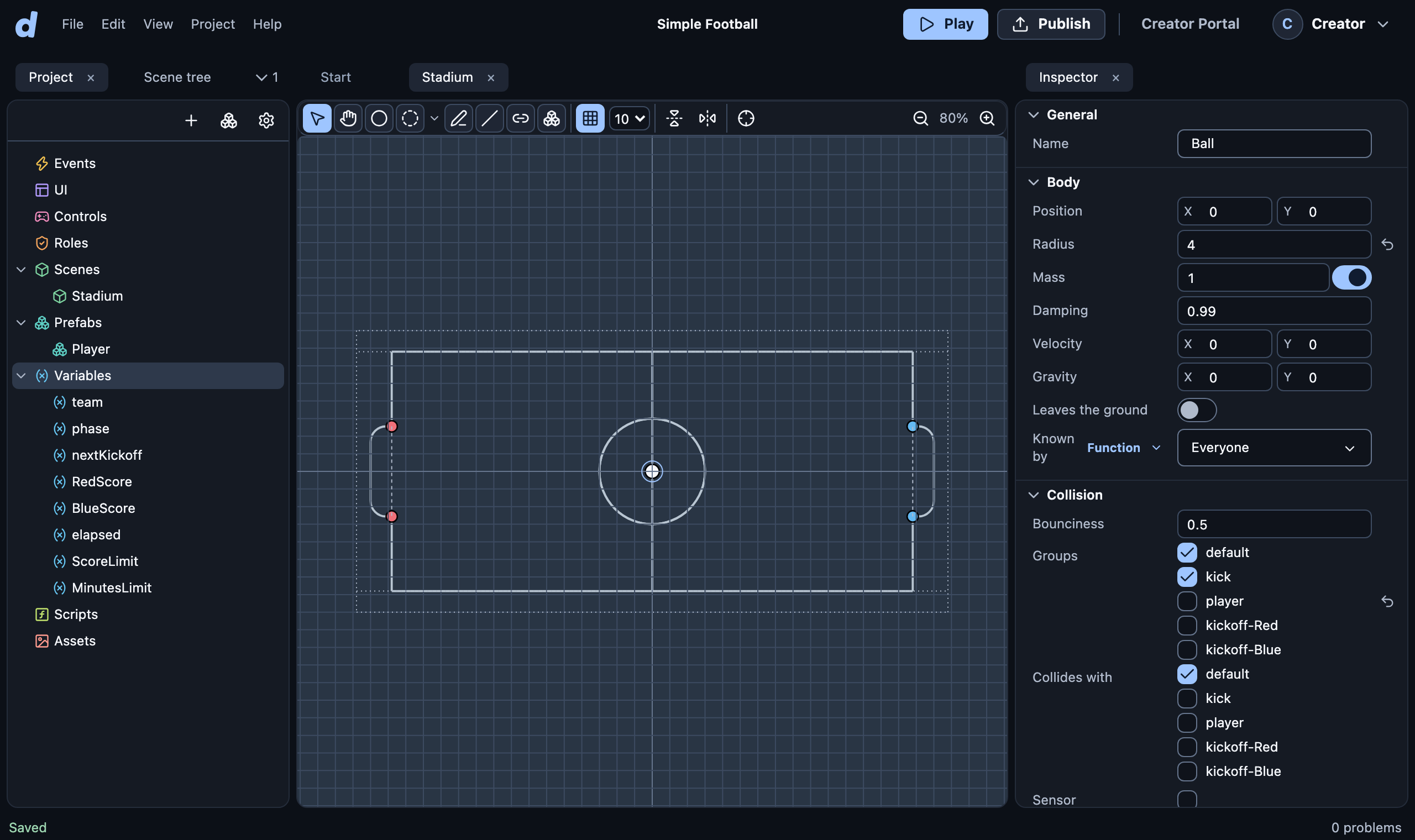
Left: your project (Events, UI, scenes, prefabs, variables…). The Scene tree tab beside it lists the objects in the open scene.
Middle: what you are editing, one tab each.
Right: the Inspector. It edits what you selected.
Top: Play to test, Publish to share.
Every change saves by itself, and everyone with the project open sees it. Undo with Ctrl+Z (⌘Z on a Mac). Right-click anything to see what you can do with it.
Prefer to build it yourself?
Make your first game by hand in ten minutes, or open a finished game from the gallery.