
Menus & HUD
Build the Menu and the HUD with the retained ui API, and update them with swaps.
A game shows its interface in two places:
The Menu is what players see between matches, and over the game when they press Esc. Team selection, settings and the Start button usually live here. You build it in top-level code, so it exists as soon as the game loads.
The HUD (heads-up display) is drawn over a running match: the score, the clock. It belongs to one match, so you build it in the
starthandler.
Describing UI, not drawing it
You don't draw pixels or write HTML. You describe the interface as a tree of nodes (stacks, rows, text, buttons, images), and disko builds it in every player's browser.
You build that tree once. To change part of it later, you send a small swap, such as "replace the score text", instead of rebuilding everything. This is called a retained UI, and it keeps updates small and fast for every player.
The building blocks are functions like ui.stack, ui.row, ui.text,
ui.button and ui.image. Each takes an options object: children nests
nodes, and style takes ui.style({ … }).
Buttons send requests
Your game runs in the room, not in the players' browsers. So when a player
clicks a button, the click can't run your code directly. Instead, the
browser sends the game a request, and your ui-request handler decides
what happens.
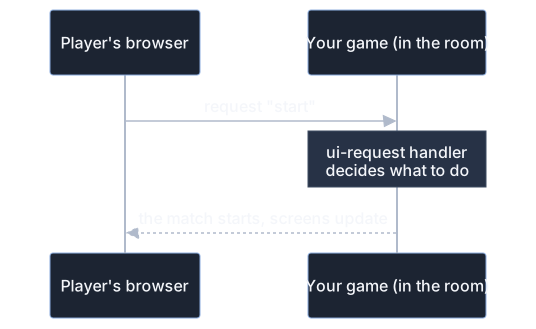
Because the game decides, a player can't cheat by sending requests the game doesn't accept: the game is always in charge of its rules.
A control's on option says which interaction sends which request:
activate (a click or Enter), submit, input, change, commit or
drop. Your handler receives the player, the request's event name and the
interaction:
Shaping requests
ui.request takes options for the cases where a plain click isn't enough:
valuessends the control's value or a whole form ("control"or"form"), checked against apayloadSchemayou define.triggerPolicydebounces or throttles fast interactions, such as a slider.concurrencydecides what happens if the player clicks again while a request is still being handled.requiresonly lets players with a permission send it (see Permissions).
To answer the control that sent a request, call request.respond(output)
once. By default the new node replaces the control itself.
Updating with swaps
To change something on screen, wrap the part that changes in a slot
(ui.slot), then send a swap that replaces the slot's content. ui.swap
describes the change, and ui.push sends it to everyone, or
ui.push(player, swaps) to one player.
This HUD shows a goal counter that updates when a goal is scored:
Besides replacing children, a swap can replace a node, append,
prepend, insert before or after, or remove it.
Local commands
Some interactions don't need the game at all, such as opening a settings
panel. Local commands run directly in the player's browser, with no round
trip. For example, a Settings button with
on: { activate: ui.open(settingsModal) } opens a modal instantly.
ui.open, ui.close, ui.show, ui.hide, ui.focus and similar commands
target a node, or "this", "form" or "slot" relative to the control.
Showing players
Three components display information about a player that your game never sees directly:
ui.flag({ player })shows their country flag.ui.connection({ player })shows their connection quality.ui.playerName({ player })shows their name, in the color and with the badge the room gave them (for example an "Admin" badge).
disko fills these in in each browser, so a game can display a player's country or connection without having access to it.
Rules to remember
Any node can take
requiresto hide or disable it for players without a permission.HUD nodes belong to their match, and Menu nodes to their game. Using a node after its match or game has ended throws a
StaleHandleError, so don't keep HUD nodes around afterstop.
See the ui reference for every component and option.